

一键诊断One-click diagnostics
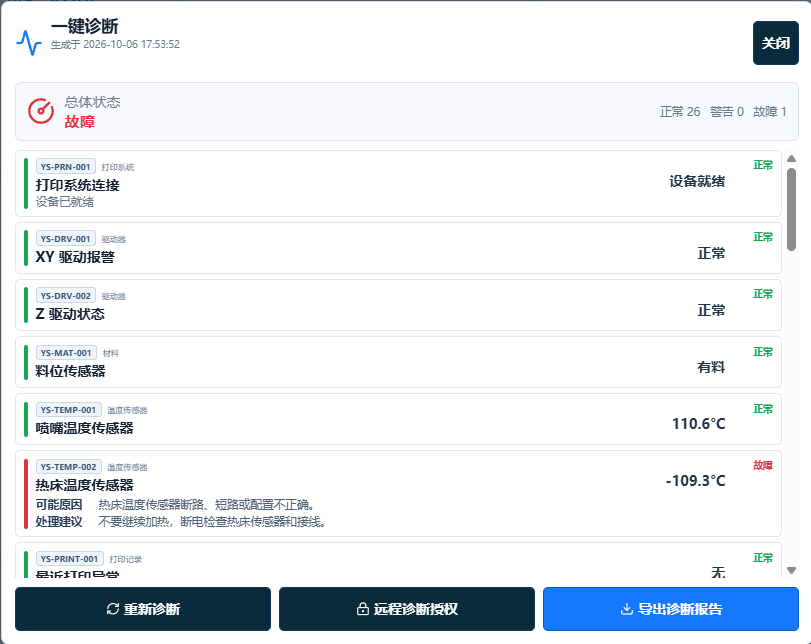
结合设备运行数据检查关键服务、接口和系统资源,辅助分析异常原因,提供故障排查建议。Checks machine operating data, key services, interfaces and system resources to help analyze faults and suggest troubleshooting steps.
可授权的工程维护服务User-authorized engineering support
通过一键诊断、限时授权、签名升级和恢复点,协助设备定位问题并管理版本。One-click diagnostics, time-limited authorization, signed updates and restore points help identify machine issues and manage versions.
从用户发起到工程师协助FROM USER REQUEST TO ENGINEER SUPPORT
具体授权时长、升级方式及恢复能力以交付版本和现场条件为准。Authorization duration, update methods and recovery features depend on the delivered version and site conditions.
结合设备运行数据检查关键服务、接口和系统资源,辅助分析异常原因,提供故障排查建议。Checks machine operating data, key services, interfaces and system resources to help analyze faults and suggest troubleshooting steps.
远程诊断仅在用户主动开启的限时授权范围内进行,授权时长以适用版本为准。Remote diagnostics operate only within the time-limited access granted by the user. The authorization duration depends on the installed version.
按实际设备版本更新相关组件,减少版本不一致。Update relevant components for the installed machine version to reduce version inconsistencies.
在支持的版本和条件下建立恢复点,并提供回滚路径。Create restore points and provide a rollback path on supported versions and under suitable conditions.
需要工程师协助时,由用户主动发起限时授权。升级和恢复操作应先确认机型、当前版本及适用流程,可在咨询时安排演示。When engineering support is needed, the user initiates time-limited authorization. Confirm the machine, current version and applicable procedure before updates or recovery; a demonstration can be discussed with support.
咨询诊断与维护演示Ask about a diagnostics demonstration提供设备型号与当前版本,了解诊断、授权、升级和恢复的适用条件。Share the machine model and current version to confirm requirements for diagnostics, authorization, updates and recovery.