软件与数字系统 Software & Digital Systems

从切片到云端,打通大尺寸打印全流程 A Connected Workflow from Slicing to the Cloud

围绕工业级大尺寸设备构建从模型处理、工艺配置、任务执行到远程运维的数字化系统。云杉切片、设备控制、颗粒挤出补偿、群控管理和微信小程序智控相互协同,让复杂设备更易使用,让长时间打印过程更透明,也让工程师能够更早发现并处理风险。 Built for industrial large-format equipment, our digital system connects model preparation, process configuration, job execution and remote service. Yunshan slicing, machine control, pellet-extrusion compensation, fleet management and WeChat access work together to simplify operation, improve visibility during long print jobs and help engineers identify risks earlier.

云杉云智控 / CLOUD CONTROLYUNSHAN CLOUD CONTROL

设备在线,状态随时掌握Your Equipment, Always Within Reach

设备端云智控与微信小程序协同连接打印现场、工程师和管理人员。用户可查看设备绑定状态、当前任务、打印进度、温度、挤出状态与按需摄像画面,并在授权范围内执行必要的远程操作,减少反复往返设备现场的时间。On-device Cloud Control and the WeChat Mini Program connect the print floor with engineers and managers. Authorized users can review binding status, active jobs, progress, temperatures, extrusion status and on-demand camera images, while performing essential remote actions without repeatedly returning to the machine.

01设备端云智控On-device Cloud Control
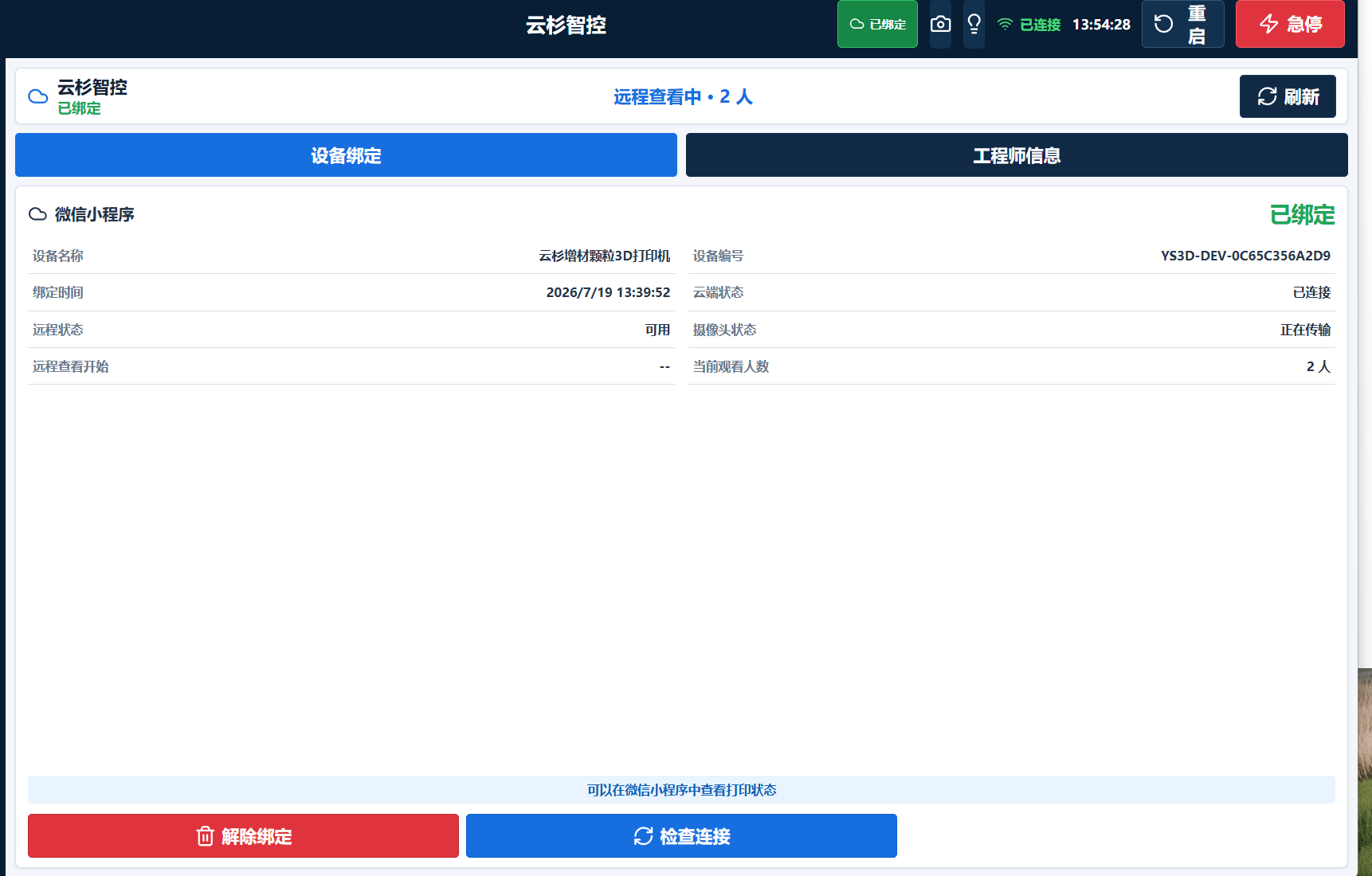
云杉云智控设备端绑定与远程连接界面
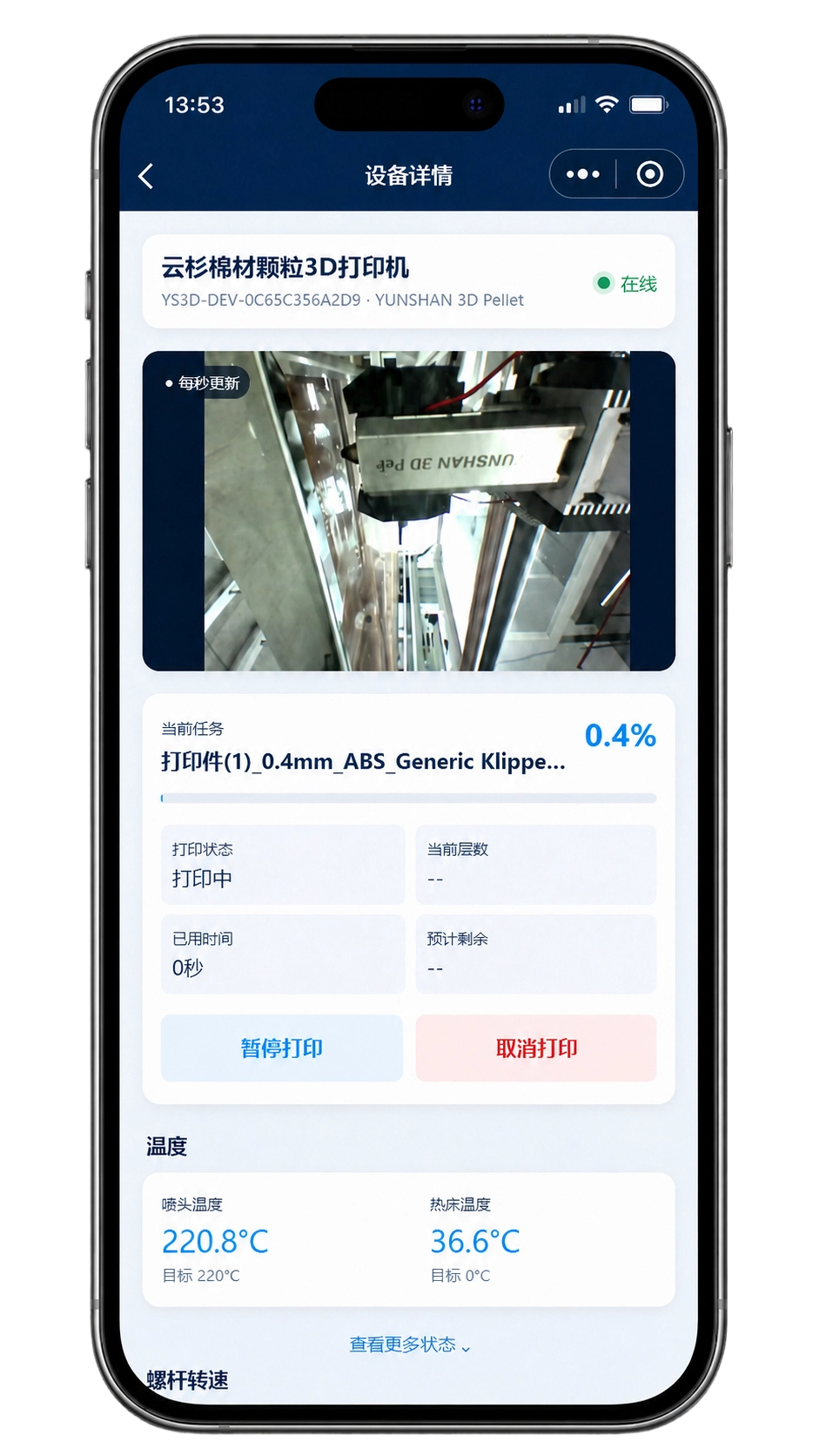
微信远程查看云杉增材打印设备状态
01打印机端服务Printer Service连接设备控制系统,采集必要运行状态Connects to the machine control system and collects essential telemetry
02云杉云服务YUNSHAN Cloud安全转发设备状态、指令与按需画面Securely relays status, commands and on-demand images
03微信小程序WeChat Mini Program远程查看设备与打印任务Remote access to equipment and print jobs

实时状态与按需画面Live Status & On-Demand View

集中查看设备在线状态、任务文件、打印进度、喷头与热床温度、颗粒挤出转速等关键数据。摄像画面仅在用户主动查看时按需传输,既方便确认现场情况,也减少不必要的网络占用。Review connectivity, job files, progress, nozzle and bed temperatures, pellet-extrusion speed and other essential data in one place. Camera images are transmitted only when requested, providing visual confirmation while avoiding unnecessary network use.

微信绑定与远程控制WeChat Binding & Control

通过微信登录和二维码完成设备绑定,在手机端快速进入设备详情。工程师可根据权限远程暂停、继续或取消打印,适合夜间长任务、异地协作和多岗位共同关注的项目。Sign in through WeChat and bind a machine by QR code for fast access to equipment details. Based on permissions, engineers can pause, resume or cancel jobs remotely—useful for overnight printing, distributed collaboration and projects monitored by multiple roles.

本地优先,安全运行Secure & Local-First

打印任务的核心执行保持在设备本地,云端主要承担状态转发、授权访问和远程协作。即使临时网络波动或云端不可用,已经开始的本地打印任务仍可继续,降低长时间成型对外部网络的依赖。Core job execution remains local to the machine, while the cloud primarily supports status relay, authorized access and collaboration. If the network or cloud service is temporarily unavailable, an active local print can continue, reducing dependence on external connectivity during long builds.

01 / 生产透明度

从“设备正在运行”到“任务进展可判断”From Machine Activity to Actionable Job Visibility

大尺寸打印往往持续数十小时甚至更长,仅知道设备在线并不足够。云智控把任务进度、温度、状态和现场画面组织在同一视图中,帮助团队判断打印是否按计划推进、是否需要安排现场检查,以及剩余时间如何协调后续工序。Large-format jobs often run for many hours or longer, so knowing that a machine is merely online is not enough. Cloud Control brings progress, temperatures, machine state and visual confirmation into one view, helping teams judge whether a build is proceeding as planned and coordinate inspection and downstream work.
02 / 协同管理

让现场操作与远程关注保持一致Keep On-Site Work and Remote Oversight Aligned

设备操作者、工艺工程师和项目负责人可以围绕同一台设备和同一项任务获得一致信息。对多设备用户,可减少电话确认、截图转发和重复记录,让异常沟通、任务交接与维护判断更直接。Operators, process engineers and project owners can work from the same machine and job information. For multi-machine teams, this reduces status calls, screenshot forwarding and duplicate records, making exception handling, shift handovers and maintenance decisions more direct.

设备健康 / ONE-CLICK DIAGNOSISEQUIPMENT HEALTH / ONE-CLICK DIAGNOSIS

设备故障一键诊断One-Click Equipment Diagnostics

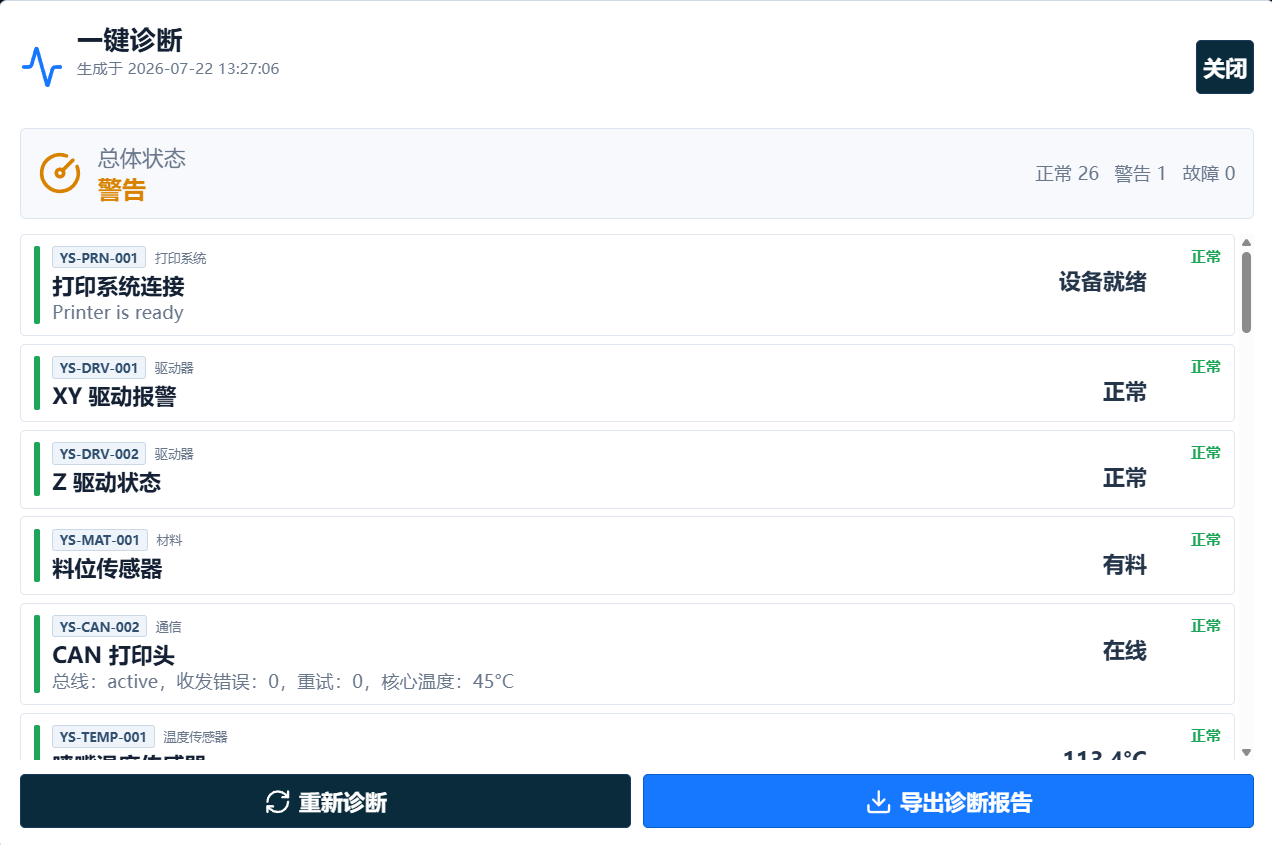
一键检查打印系统连接、运动驱动、料位传感、通信总线与温控等关键状态,并用正常、警告和故障分级呈现结果。工程师无需逐项进入多个界面,即可快速了解设备健康状况,提前发现潜在异常,帮助避免小问题演变为停机、返工与材料损失。 Check printer connectivity, motion drives, material sensing, communication buses and thermal control in one step, with results grouped as normal, warning or fault. Engineers can understand machine health without navigating multiple interfaces, identifying risks before they lead to downtime, rework or material loss.

云杉增材设备故障一键诊断界面
01

关键系统全面检查Critical-System Coverage

集中检查打印连接、XY/Z 驱动、料位传感器、打印头通信、关键温度与相关保护状态,减少依赖人工逐项排查的时间。Review printer connectivity, XY/Z drives, material sensors, printhead communication, critical temperatures and protection states together, reducing manual troubleshooting time.

02

异常提前预警Early Risk Alerts

区分正常、警告与故障状态,并显示对应检查项目。团队可优先处理影响生产的风险,避免轻微异常在长时间运行中持续放大。Separate normal, warning and fault states by inspection item, allowing teams to prioritize production risks before minor abnormalities grow during long-running jobs.

03

诊断报告可追溯Traceable Reports

支持重新诊断与导出报告,保留诊断时间和状态结果,为远程技术支持、维护判断、故障复盘和设备交接提供清晰依据。Rerun checks and export time-stamped results to support remote service, maintenance decisions, fault reviews and machine handovers.

诊断的作用不是替代工程师,而是缩短发现问题和组织信息的时间。Diagnostics do not replace engineers; they shorten the time needed to find a problem and organize the evidence.

当设备出现警告时,诊断结果可作为现场检查和远程支持的共同起点。工程师能够更快确认需要检查的部件、判断设备是否适合继续运行,并减少因描述不完整造成的重复沟通。When a warning appears, the diagnostic result becomes a shared starting point for on-site inspection and remote support. Engineers can identify what to inspect, decide whether operation should continue and reduce repeated communication caused by incomplete descriptions.

云杉定制切片与群控软件 Yunshan Slicing & Fleet Control Software

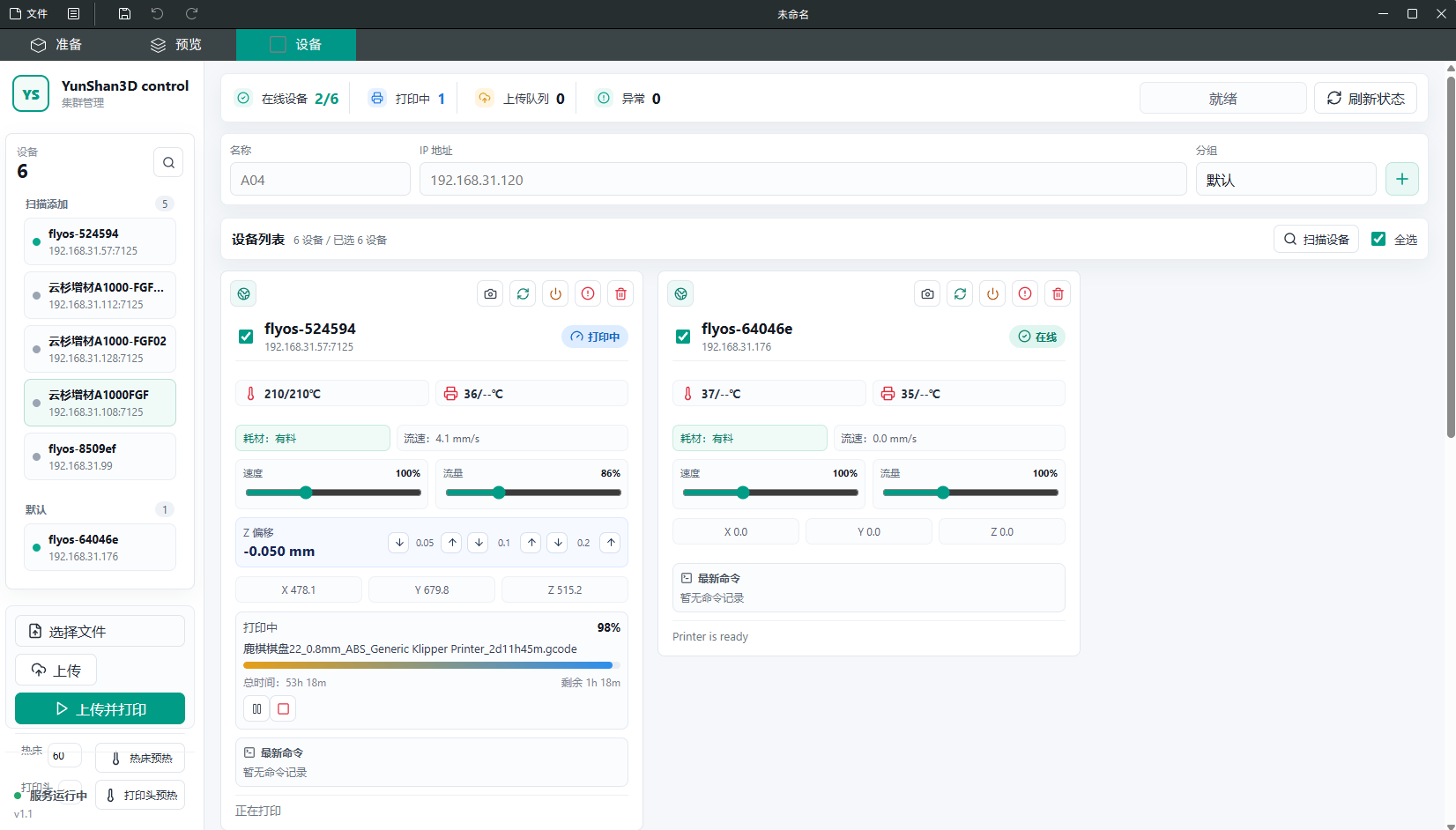
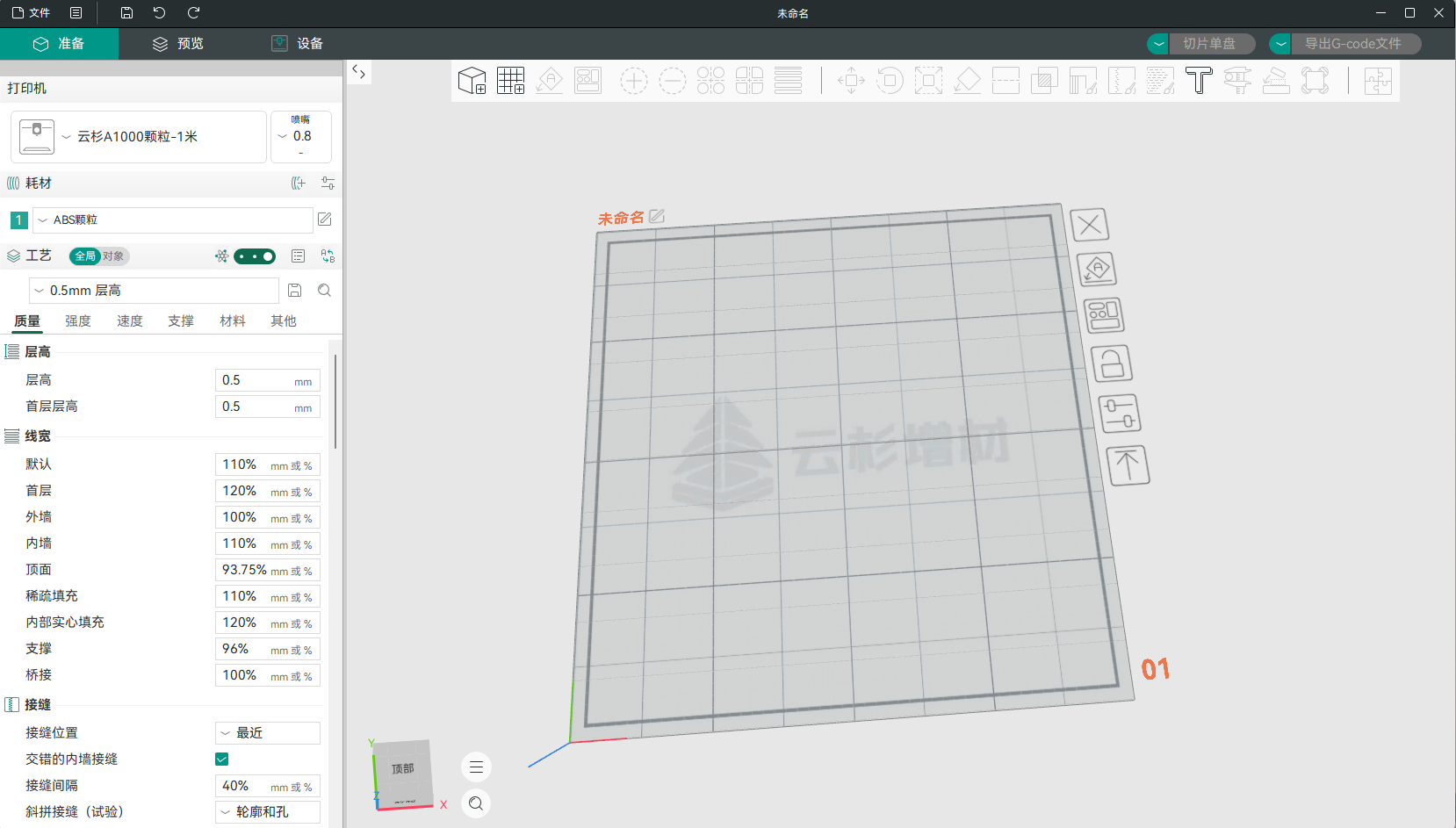
针对大尺寸 FGF/FDM 工艺进行系统级优化,并将多设备群控集成到同一软件中。工程师可在切片阶段配置材料与工艺参数,在设备页面查看多台设备状态、上传任务并安排打印,减少模型准备、参数设置和生产调度之间的软件切换。 Optimized at system level for large-format FGF/FDM, with multi-machine control integrated into the same application. Engineers can configure materials and processes during slicing, review multiple machines, upload jobs and arrange production without repeatedly switching between preparation, parameter and scheduling tools.

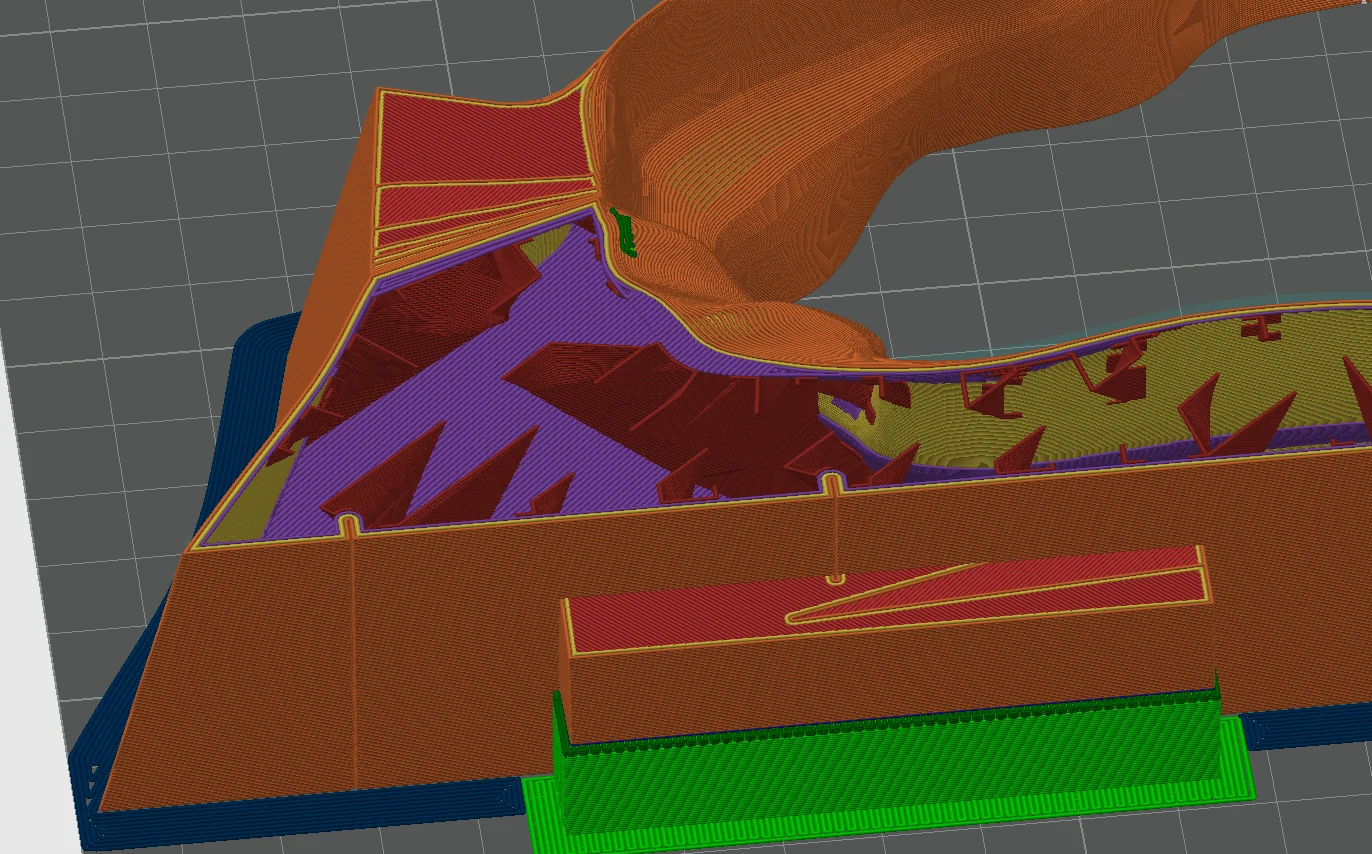
云杉定制切片软件工作界面
切片工作台Slicing Workspace颗粒材料参数与大尺寸打印工艺配置Pellet profiles and large-format process configuration
云杉切片软件集成群控界面
集成群控Integrated Fleet Control多设备状态、任务进度与集中操作Multi-device status, job progress and centralized operation
Intelligent Slicing Algorithm

智能切片算法 Intelligent Slicing Algorithm

围绕大型零件的收缩、热积累、层间结合和局部强度进行工艺配置,支持收缩率补偿、层间温度控制、变路径宽度与关键区域加强。参数可根据材料、喷嘴、层高和模型结构进行匹配,帮助提高首件验证效率与长期任务稳定性。 Configure processes around shrinkage, heat accumulation, interlayer bonding and local strength in large parts. Shrinkage compensation, interlayer temperature control, variable path width and critical-area reinforcement can be matched to material, nozzle, layer height and part structure.

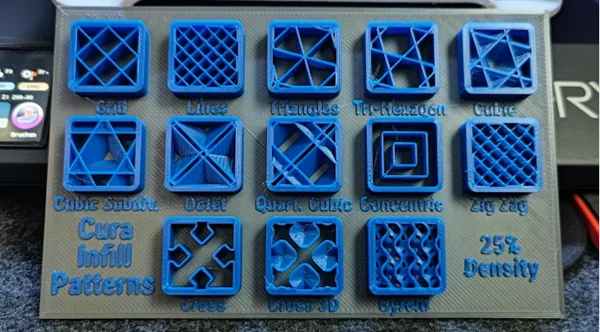
Various Infill Patterns

多种填充模式 Various Infill Patterns

提供面向高刚性、轻量化、支撑效率和材料节约的多种填充方案,可根据受力区域设置不同密度,在打印时间、材料用量和结构性能之间取得更合理的平衡。 Choose infill strategies for stiffness, lightweighting, support efficiency and material savings. Region-based density helps balance print time, material consumption and structural performance according to load requirements.

01 / 单机生产

长时间任务远程关注Remote Oversight for Long Jobs

适合大型模具、雕塑和功能构件等长时间打印任务,减少非必要值守,同时保留现场状态确认和必要控制能力。Suitable for long-running molds, sculptures and functional parts, reducing unnecessary attendance while retaining status confirmation and essential control.

02 / 多机协同

集中查看设备与任务Centralized Fleet and Job View

适合打样中心、研发部门和小批量生产团队,在一个界面内掌握多台设备的在线、打印和异常状态。For prototyping centers, R&D departments and low-volume production teams that need one view of online, printing and exception states across machines.

03 / 技术服务

诊断信息辅助远程支持Diagnostic Context for Remote Service

设备状态和诊断报告为用户与技术工程师提供统一信息基础,帮助缩短问题描述、定位和处理路径。Machine status and diagnostic reports provide a shared information base for customers and service engineers, shortening problem description and resolution paths.

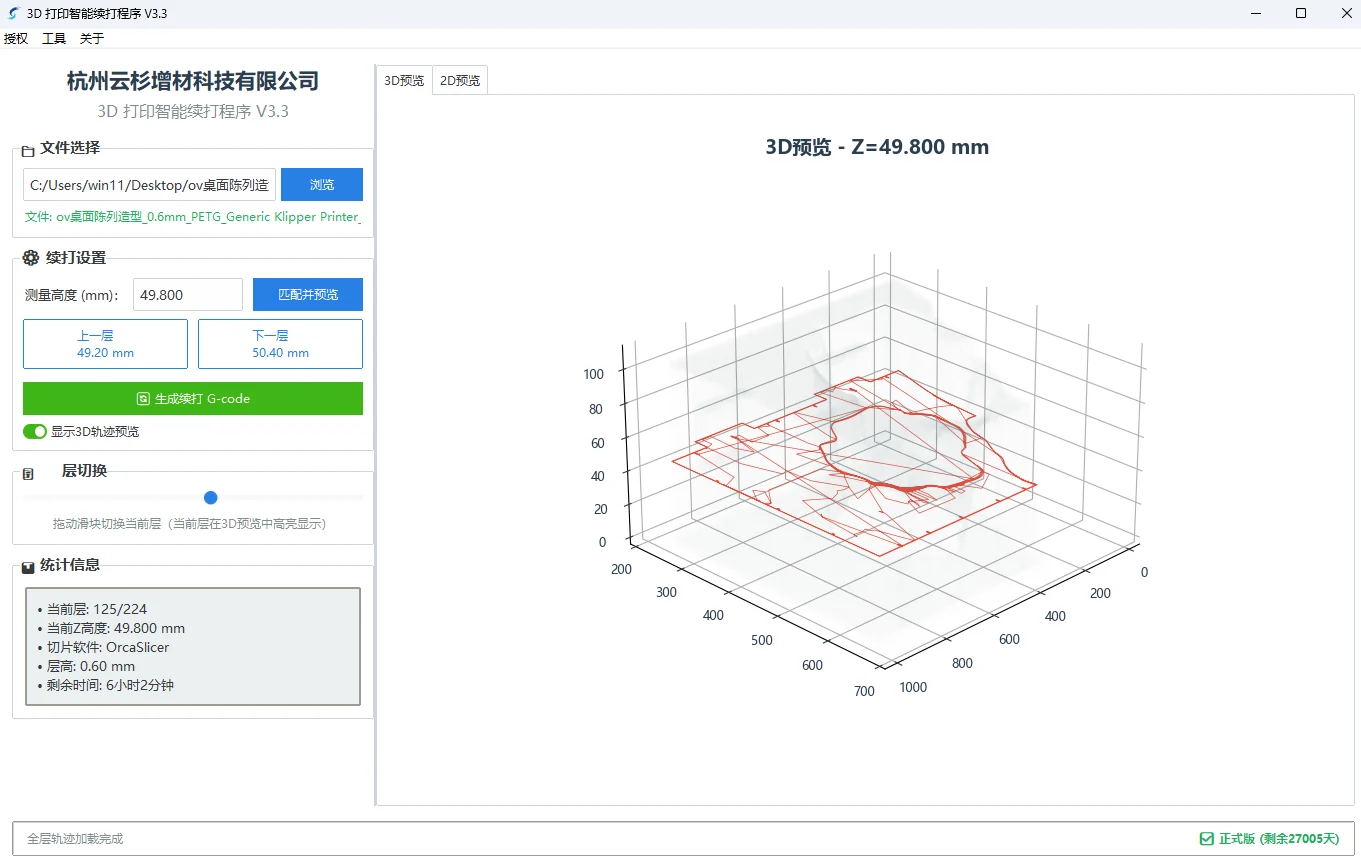
自主研发智能续打软件 (专利技术) Self-developed Intelligent Resumption Software (Patented)

面向打印时间长、单件材料投入高的大尺寸任务,提供 G-Code 深度可视化与中断恢复辅助能力,帮助工程师在打印前检查路径,在异常后评估恢复条件。 For long-running large-format jobs with substantial material investment, G-Code visualization and recovery assistance help engineers inspect toolpaths before printing and evaluate recovery conditions after an interruption.

Visualization Preview

G-Code 2D/3D 可视化预览 G-Code 2D/3D Visualization Preview

支持在打印前和打印过程中查看 G-Code 的 2D 层路径与 3D 成型轨迹,辅助检查模型位置、层高变化、填充与支撑路径。对于大尺寸工件,可在投入大量时间和材料前更直观地确认关键区域。 Inspect 2D layer paths and 3D build trajectories before and during printing to review model placement, layer changes, infill and support paths. For large parts, critical regions can be checked before substantial time and material are committed.

核心硬件控制系统 Core Hardware Control System

将传感器、运动控制、材料状态和任务数据结合起来,为大型工件提供从首层建立到长时间运行的过程保护。 Sensors, motion control, material state and job data work together to protect large builds from first-layer setup through long-duration operation.

Auto Resumption

自动断电续打与断料检测 Auto Power-off Resumption & Filament Detection

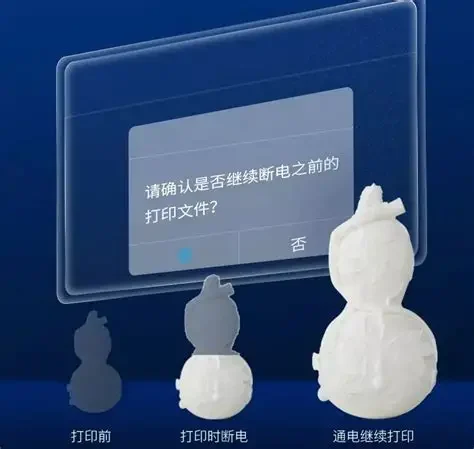
系统结合材料传感、任务状态保存与过程保护机制。检测到断料时可暂停并提示,供电恢复后根据设备配置、坐标状态和任务条件评估续打,尽可能降低长时间打印因意外中断造成的材料与工时损失。 Material sensing, job-state preservation and process protection work together. A material interruption can pause the job and notify the operator; after power returns, recovery is evaluated according to machine configuration, coordinate state and job conditions.

Automatic Leveling

智能自动调平系统 Intelligent Automatic Leveling

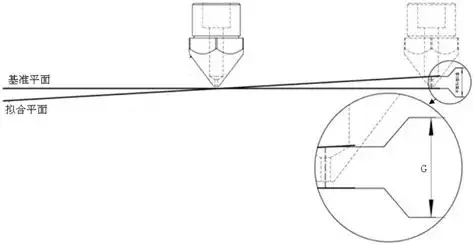
通过传感器采集大尺寸平台不同位置的高度数据,建立平台补偿模型,并在打印过程中修正细微偏差。配合首层工艺参数,可改善大面积首层的一致性、附着表现与后续成型稳定性。 Sensors measure height across the large build platform to create a compensation model that corrects small deviations during printing. Combined with first-layer process settings, this improves consistency, adhesion and subsequent build stability.

设备、工艺与数字服务协同交付Equipment, Process and Digital Services Together

我们会根据设备数量、现场网络、团队分工、材料路线和管理需求评估软件配置,并结合设备交付完成账号绑定、基础培训与使用流程说明。Software configuration is matched to fleet size, site networking, team responsibilities, material process and management needs, with account binding, basic training and workflow guidance included in equipment delivery.

咨询软件配置Discuss Software